
Hydden auto-generates access policies based on the group membership and entitlements of an identity's peers, so routine access approves itself and only the exceptions reach a reviewer.
Access reviews ask one question thousands of times: should this account have this access? Answering it requires knowing what access is normal for someone doing that job. So Hydden created a way to have routine access approved and leave only the exceptions for the reviewer.
Our identity data fabric builds a Role for every identity based on the owner attributes you choose, then compares each account's properties and activity to its peers in that Role. Accounts that match the pattern get an automatic decision to approve or deny, and the rest become your access review.
Roles generated from owner attributes
Consider a review of several hundred accounts with privileged access to your Oracle database estate. Presented as a flat list, every one of them looks equally justified, so the whole batch gets rubber-stamped.
To prevent this, Hydden first aggregates accounts that share the owner attributes you select. In the simplest form, every account whose owner has the same department and title lands in one Role, producing a name like it-database_administrator. Now, we can start to work off this defined peer group instead of a list.
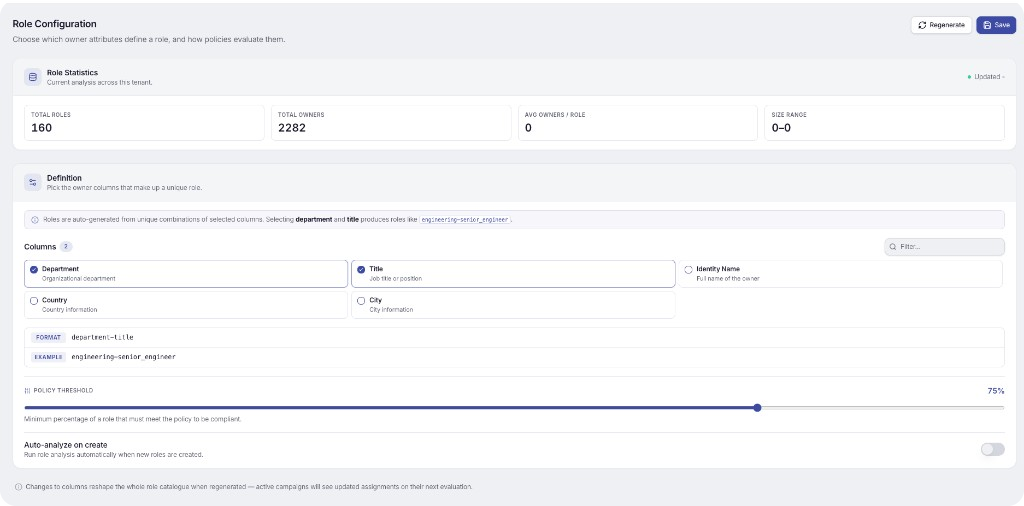
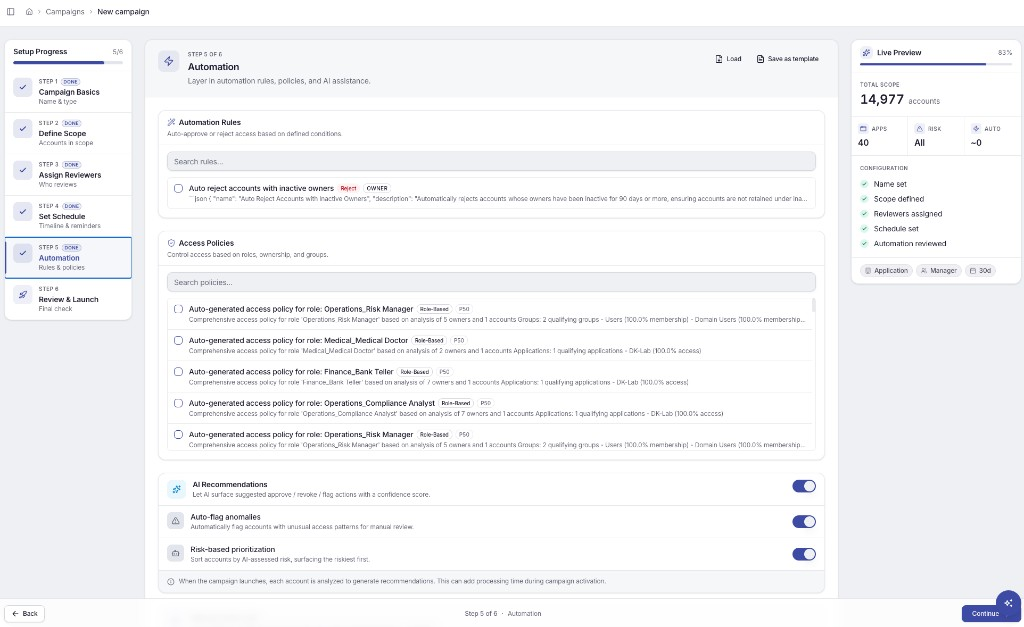
Within that Role, Hydden compares group memberships and entitlements on the Oracle systems themselves. When the percentage of accounts holding the same access clears your threshold, 75% in this example, Hydden generates a policy that auto-approves that access for every account in the Role.
An account granted that access later is approved automatically at the next review.
The outliers arrive with their differences explained
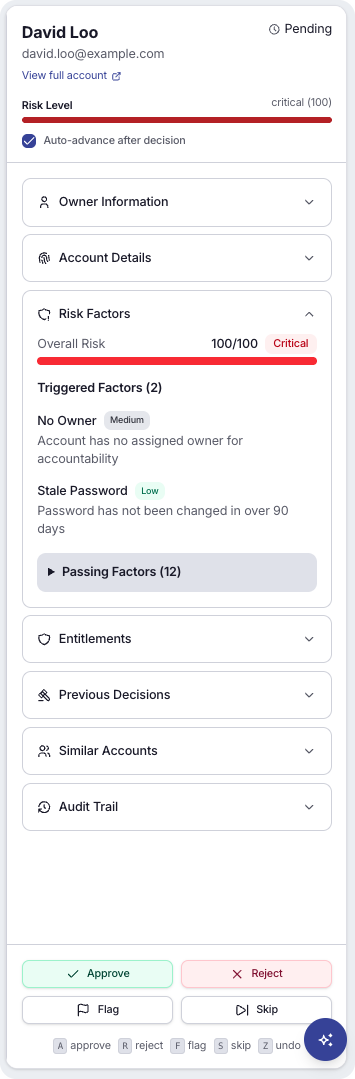
The accounts whose memberships and entitlements do not match their peers are what reach a reviewer. Each one arrives with the rights that differ from the peer group, alongside the account's actual historical activity. The decision rests on what the account has done, not on what it was granted.
How account activity detects outliers
Hydden's entitlement analysis carries each account's event data, so it reflects what an account actually did, not only the rights a scan captured the last time it ran. The data is real-time. An account whose rights match its peers can still be flagged as an outlier on behavior alone.
That flag points you to the account's historical permission and configuration changes. More on this in an upcoming blog.
Frequently asked questions
How does Hydden generate access policies automatically?
Hydden builds a Role for every identity from owner attributes you select, such as department and title, then compares the group memberships and entitlements held by every account in that Role. When the share of accounts holding the same access clears your threshold, Hydden generates a policy that auto-approves that access for the whole Role. Nobody authors the policy by hand.
What does the policy threshold do?
It sets the minimum percentage of accounts in a Role that must share the same group memberships and entitlements before Hydden treats that access as normal. At 75%, three of every four accounts holding the same access is enough to generate an auto-approval policy. Raise the threshold for fewer, higher-confidence policies, or lower it for broader coverage.
What happens when someone in the Role gets that access later?
They are approved automatically at the next review. The policy covers every account in the Role, so an account granted the access after the policy exists is already in policy and does not need a new reviewer decision.
How are rejections handled in an access review campaign?
Condition-based automation rules run in the same campaign setup step as the generated policies. One example rejects access whose owners have been inactive for 90 days or more, so dormant ownership is cleaned up without a reviewer working through the list.
How is this different from peer group analysis in other IGA tools?
Hydden's entitlement analysis includes each account's event data, so it reflects what an account actually did rather than the rights captured by the last scan. Because that data is real-time, an account whose rights match its peers can still be flagged as an outlier on behavior alone.
What do I look at when an account is flagged as an outlier?
The flag points you to the account's historical permission and configuration changes, so you can see what changed on the account and when it changed.